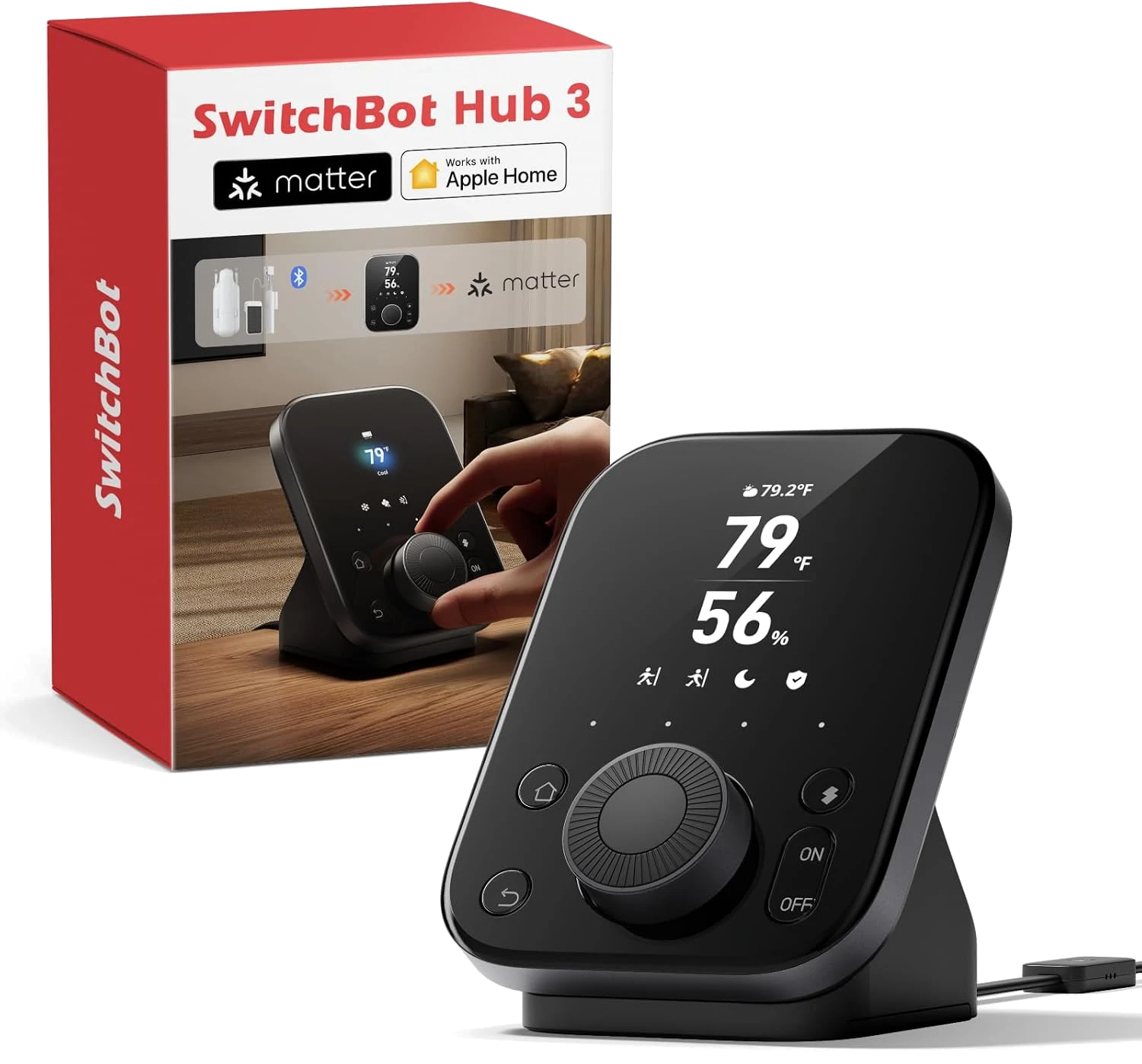
Most smart home hubs hide in a drawer or behind the TV, blinking quietly while you poke at an app to change anything. The SwitchBot Hub 3 wants to be the opposite. It puts a 2.4-inch color screen and a physical dial on your wall or counter, so you can nudge the thermostat or fire off a scene without unlocking your phone. At $99, though, it costs roughly double the older Hub 2, and that gap is the whole question.
This SwitchBot Hub 3 review is built from spec sheets, manufacturer documentation, and the pattern of verified-purchase owner feedback, not a first-hand bench test. The goal is simple: figure out who the extra money actually helps.
What Is the SwitchBot Hub 3?
The Hub 3 is SwitchBot's flagship smart home controller. Strip away the marketing and it does four jobs at once. It's an infrared blaster that learns your old TV, air conditioner, and fan remotes. It's a sensor station with built-in temperature, humidity, light, and presence detection. It's a Matter bridge that pulls SwitchBot gear and some third-party Matter devices into Apple Home, Alexa, Google Home, SmartThings, and Home Assistant. And it's a physical control panel, with a color display, a rotary knob, and four shortcut buttons you can map to scenes.
That last part is what separates it from almost everything else in this price range. Bluetooth reaches up to 200 meters for SwitchBot's own accessories, and the hub connects to your network over 2.4GHz Wi-Fi. It can display a CO2 reading too, if you pair it with SwitchBot's Meter Pro.
Who Should Buy the SwitchBot Hub 3?
Buy the Hub 3 if you want tactile control that lives in a room, not just on a phone. Think a kitchen counter where you spin the dial to dim the lights while your hands are full, or a hallway panel that runs a "leaving home" scene with one press. It suits people who already own SwitchBot curtains, bots, or blinds and want a single command center for them.

It also fits anyone stitching together a mixed ecosystem. If you've got a few Matter bulbs from one brand and a lock from another, the Hub 3 acts as the bridge that lets Apple Home or Alexa see them together. Renters like it because the IR blaster makes a "dumb" window AC unit voice-controllable without touching the wiring.
Skip it if your smart home is three bulbs and a plug. You don't need a $99 control surface for that, and the app on your phone will do the job for free.
What $99 Actually Buys You
- A real control panel. The 2.4-inch color screen, rotary dial, and four capacitive shortcut buttons mean common actions happen without the app. For a device you walk past twenty times a day, that convenience adds up fast.
- A wider Matter bridge. The Hub 3 handles up to 30 secondary Matter devices, versus 8 on the Hub 2. It can also relay some third-party Matter products like Philips Hue and IKEA, not just SwitchBot's own hardware.
- Four sensors in one puck. Temperature, humidity, light, and presence detection are built in, so you can trigger automations ("turn on the fan above 78F") without buying separate sensors.
- A learning IR blaster. Point your old remotes at it once and the hub can run your TV, soundbar, or air conditioner inside scenes and schedules.
What You'll Pay
At $99, the Hub 3 sits at the premium end of smart home hubs, and you're paying for the screen and physical controls more than the connectivity. The step-down Hub 2 covers the same core Matter-bridge and IR-blaster duties for meaningfully less, minus the color display, the dial, presence sensing, and the higher device ceiling. The price widget above shows where today's number lands against the price we've tracked, so you can tell whether the current listing is a genuine discount or just the standard rate before you commit.
SwitchBot Hub 3 vs. the Alternatives
The obvious internal comparison is the SwitchBot Hub 2. It's the better buy if you only need a Matter bridge and IR blaster and don't care about a display or a dial. You lose presence sensing and drop from 30 Matter devices to 8, but you keep the parts most people actually use, for less money.

The other rival is Amazon's Echo Hub, a wall-mounted Alexa control panel. Echo Hub is the smarter pick if your home runs entirely on Alexa and you want a bigger touchscreen dashboard, but it leans on Alexa's ecosystem rather than acting as a broad Matter bridge with built-in sensors. If your control surface is really about voice and video, our Echo Show 8 review covers that Alexa-first angle, since a Show can double as a countertop panel too.
One Thing to Consider
The Hub 3 is Wi-Fi only. There's no Zigbee or Thread radio inside, which matters more than it sounds. A lot of the smart home world, including many locks, sensors, and bulbs, runs on Thread now, and Matter increasingly assumes a Thread border router in the house. The Hub 3 can bridge Matter-over-Wi-Fi devices, but it won't act as that Thread router. Some owners and reviewers also describe the hub as trying to be too many things at once, with a feature set that outruns how polished the software feels day to day. If you were hoping this one box would become the single Thread hub for your whole home, it isn't that.
FAQ
Q: Does the SwitchBot Hub 3 work with Apple HomeKit? Yes. It bridges compatible SwitchBot and Matter devices into Apple Home, alongside Alexa, Google Home, SmartThings, and Home Assistant. Note that only devices SwitchBot exposes over Matter show up in Apple Home, not every feature in the SwitchBot app.

Q: Is the Hub 3 worth it over the Hub 2? It's worth the jump if you'll use the color screen, the dial, and presence sensing, or if you plan to bridge more than eight Matter devices. If you just need a Matter bridge and IR blaster, the cheaper Hub 2 does that same core job.
Q: Does the Hub 3 support Thread or Zigbee? No. It connects over 2.4GHz Wi-Fi and Bluetooth only. If you need a Thread border router or Zigbee coordinator for locks and sensors, you'll want a different or additional hub.
The Verdict
The SwitchBot Hub 3 is the best physical control panel SwitchBot has made, and the sensor suite plus wider Matter support justify the $99 for a genuine smart home enthusiast. If you only want a quiet bridge in a drawer, or you need Thread, save your money and grab the Hub 2 or something with the right radios.
If the price in the card above sits near or below what we've tracked, and you actually want dials and a screen instead of another app, the Hub 3 is an easy yes.